Pages

Ads 468x60px

Mobile TechTunes widget

Labels

Showing posts with label IPHONE. Show all posts

Tuesday, July 10, 2018

How to hide inbuilt apps on iPhone

This post i will show to hide inbuilt apps on iPhone..Follow some step. Let's start.

1. Go to setting


2. Click on Genaral


3. Click on Restrictions
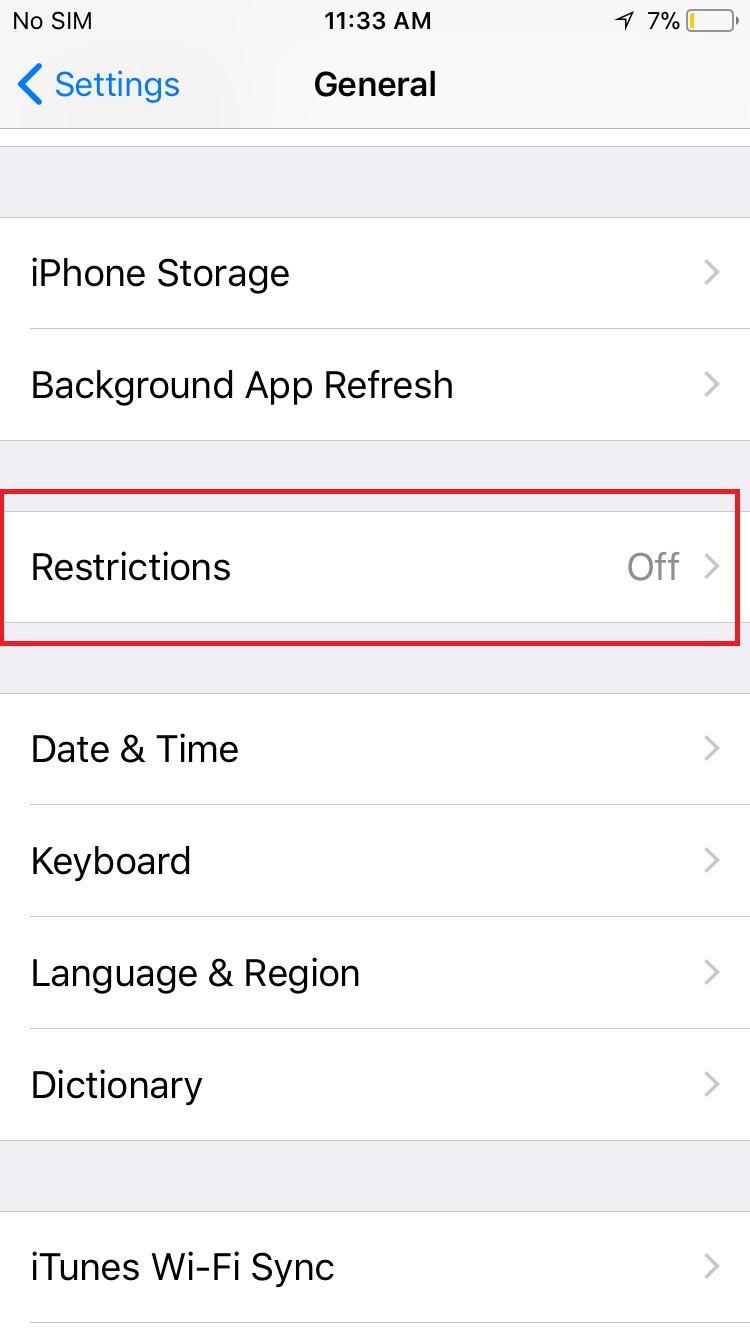


4. Tap Enable Restrictions


5.Create a Restrictions passcode. You need your Restrictions passcode to change the settings or to turn off Restrictions.


6. Again Enter  Restrictions passcode


7. Turn off apps, which one  you want


 TIPS: If you forget your Restrictions passcode, you'll need to erase your child's device, then set it up as a new device to remove the Restrictions passcode. Restoring your child's device using a backup won't remove the Restrictions passcode.

WATCH THE VIDEO


Continue Reading...

Friday, July 6, 2018

How to use and set up Touch ID on iPhone

This post I will show how to use and set up Touch ID on iPhone.just follow some step. Let's start.

Before you start to set up Touch ID, you need to create a passcode for your device.
1. Make sure that your iPhone home button and your finger are clean and dry.

2. Go to setting


3. Click on Touch ID and Passcode


4. Then enter your passcode 

5. Click on Add a Fingerprint


6. Touch the home button with your finger, which selected for finger lock, but doesn't press. Hold it there until you fill a quick vibration.


7.  Continue to lift and rest your finger slowly, making small adjustments to the position of your each time. 

8. The next screen asks you to adjust your grip. Hold your device as you normally would when unlocking it, and touch the home button with the outer areas of your fingertip, instead of the center portion that you scanned first.


9. After complete,  click to  Continue


After setting up Touch ID, you can use Touch ID to Unlock your iPhone. Just press the home button using the finger you registered with Touch ID.


Watch the video


Continue Reading...

Sunday, July 1, 2018

How to uninstall/delete apps on iPhone

This post I will show, How to uninstall/delete apps on iPhone. Learn how to delete third-party apps that you've installed on your iPhone.Read the post and follow some step.

1. Go to Home 


2. which app you want to delete, Lightly touch and hold the app until it jiggles.


3. Tap in the upper-left corner of the app.


4. Then you will see pop up warning. Tap Delete.

Watch This Video


Continue Reading...

How to use & turn off-on Assistive Touch on iPhone

This post, I will show how to use & turn off-on assistive touch on iPhone.You can use assistive touch to control your device. Read the post & follow some step. Let's start.

1. Go to setting


2. Click on General


3. Click on  Accessibility


4. Click on Assistive Touch
5. Turn on AssistiveTouch

6. Turn off AssistiveTouch


When Accessibility Shortcut is on, you can turn AssistiveTouch on or off from any screen using Triple-click Home. Just press the Home button three times.

WATCH THIS VIDEO


Continue Reading...

Thursday, June 28, 2018

How to Change passcode on iPhone

In this post, I will show how to change passcode on iPhone. Just read the post & follow some step. Let's start.

 1. Go to Setting

2. Then Click Touch ID & Passcode


3. Enter  your passcode

4. Click Change Passcode


5.Enter your old passcode 


6. Enter your new passcode


7. Then again enter your new passcode for verifying


After verifying passcode will be the change.

WATCH THIS VIDEO


Continue Reading...

Friday, December 4, 2015

HOW TO TAKE SCREEN SHOT IN YOUR IPHONE WITH OUT APPS


So Many times we need to take Mobile Screenshots in any purpose.So we are use Various  type of Mobile apps.Mostly apps need to buy,and free did,t work properly always.So today i will show how to take screenshots without any apps.Its very easy method.

Step 1.Press Sleep/Wake button first.Then press home button.
Step 2. Then you will see white flash and you will hear Camera shutter sound.Now Screenshots will be save in Camera roll.
 

Continue Reading...